
Google Maps is growing in features and function. One of the side developments from it has been a UGC community called Local Guides.
People love to share their favourite places to travel, experience, and eat. And on Google Maps, you can do just that. And if you wanted your voice to have a little more credibility, sign up for Local Guides programme.
The challenge with the Local Guide programme today is more about personal branding. If you're a food, travel or event blogger, it's a little tricky creating a following.
I'll break this sharing into two parts:
- Finding your Google local guide link
- Making it shareable as a personal brand URL
The Google Maps Way
This is easily assessible from your mobile, where you'd be doing most of your location reviews.
When you sign-in to your google account on the mobile, open Maps and click on the Contribute button. Then click on the View your profile below your account name. You will see the share button at the top of your account profile.
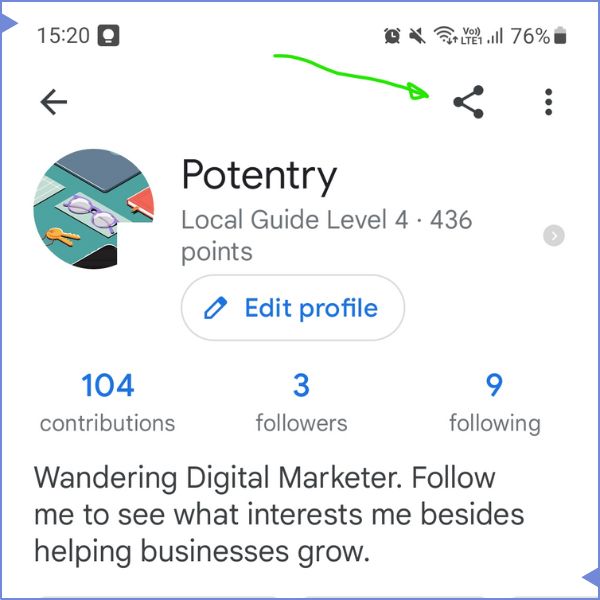
This is Google's preferred way of sharing.
I don't like it because it has other text with the share.
"See what <your account name> posted to Google Maps <your rank> <your maps URL>"
For most of us, this is good enough. You could extract that trackable map shortlink and use that.
If you want a touch of personal branding, hop to the bottom of this page.
The Local Guides Community
This is a great way to get connected with the worldwide community of local guides. See what they explore.
There are meet-up arrangements too, but I've not attended any myself yet.
To join, click on this website and link your Google Maps account as a signup.
When you view your Profile page there, that's the handy profile link you want to store. See the green arrow below. Save and pin that to your clipboard.
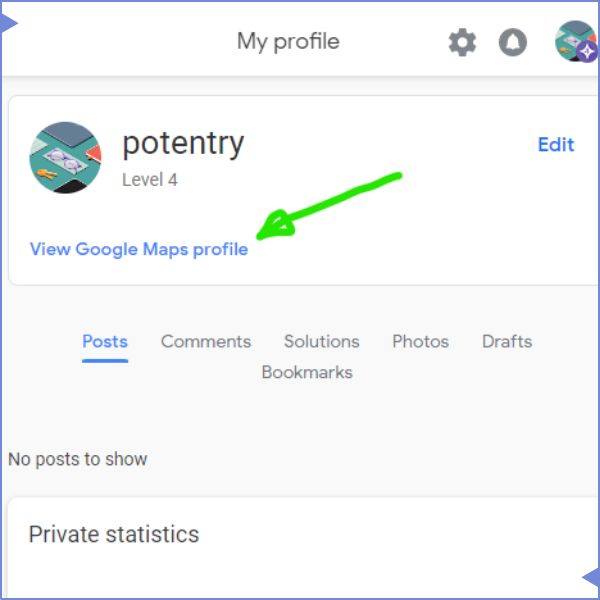
To me, this is the neatest way to grab the URL for your local guide profile.
If signing up for another website is not your thing, read on.
The Tech Know-how way
For retrieving your link in this way, you'd need to open your Google Maps account on your desktop browser.
On your Google Maps, open the sidebar. Click on "Your Contributions" (see green arrow). Then note the URL in the address line (see yellow arrow).
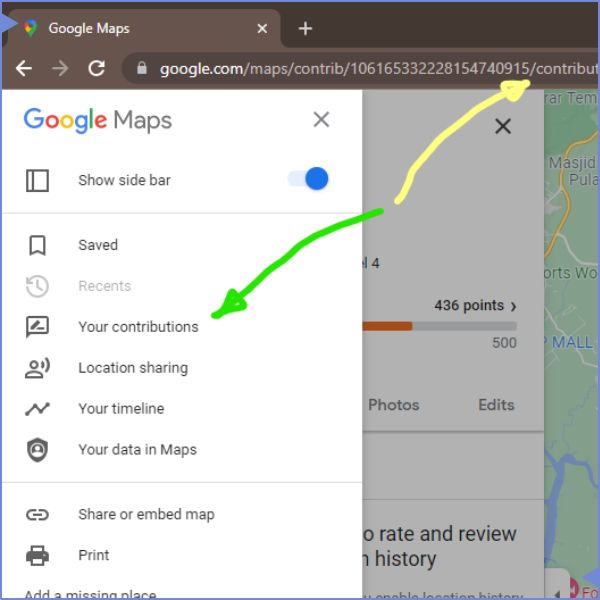
For your local guide link, you want to copy the URL to just before the "/contribute" segment. That's everything from "google.com/maps/contrib/<your long string of numbers>" up to that slash.
Now you can save that to your clipboard or notepad app.
You can test if you copied it right, by pasting that onto another browser or tab. It should open up your local guide profile, otherwise it means you missed a number or two.
If you went through any of the above 3 ways, you effectively have your Google LocalGuide URL.
Personal Branded URL
The easiest way to have your own branding link is to create it in bit.ly and edit the custom back-half.
This is an example with mine : https://bit.ly/potentrylocalguide
The better branding way is with your own personal or company website. I use wordpress as the engine for this site, and I installed a URL shortener plugin.
The example with my branding URL : https://potentry.com/localguide
And that's the two things for this writing. How to find your google local guide link and how to share it, with an insert for personal branding. Do follow me on my local guide link.
Happy trails, fellow traveller !